SharePoint 2010 Active Directory Synchronization Error: MOSS MA not found
When configuring a new SharePoint 2010 server using Active
Directory authentication, I was setting up the AD Synchronization and
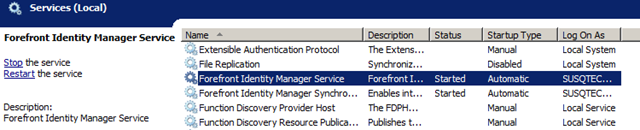
received the error “MOSS MA not found”. This was a simple fix: The
Forefront Identity Manager Service was not started. Started up this
service and then was able to configure a new AD synchronization
connection.

To create the connection, just go to SharePoint 2010 Central Admin
> Application Management > Service Applications > Manage
Service Applications > Manage User Profile Store (note that your link
will reference the actual name of your Profile Store Service
Application).
Under Synchronization, select Configure Synchronization Connections.
If you need a new connection, select Create New Connection or you can
edit an existing connection.
I am impressed with the number of connection types that SharePoint
supports out of the box: Active Directory, Active Directory Logon Data,
Active Directory Resource, Business Data Connectivity, IBM Tivoli
Directory Server (ITDS), Novell eDirectory, and Sun Java System
Directory Server.

And, of course, the three primary Authentication Provider types:
Windows Authentication, Forms Authentication, and the new Trusted Claims
Provider Authentication.

For an AD authentication, I am a huge fan of being able to utilize
specific containers for synchronization. In my demo environment, I’ve
created a couple of AD Organizational Units that I’m using for
synchronization testing.

In this entire configuration scenario, I find a one item specifically
interesting (and humorous) – the error message: MOSS MA not found. I
know that there was a tremendous code base that needed updated, but an
error message string still has ‘MOSS’? The SharePoint 2010 product no
longer has the acronym MOSS. It’s just interesting that there wasn’t a
task to do a code search for this Acronym for the new build. Maybe
someone at Microsoft could shed some insight on this. Just makes me
wonder what else will be uncovered.
To Get Domain Controller